Building a WhoAmI Plugin
In the Getting Started series, you learned the full toolkit for Headlamp plugin development — scaffolding, sidebar navigation, Kubernetes data fetching, pages, and more. Now let's apply that knowledge to solve a real problem: "Who am I in this cluster?"
In this tutorial, you'll build a focused, single-purpose plugin that adds a WhoAmI entry under the Cluster section in the cluster sidebar — alongside Namespaces and Nodes. When clicked, it shows the current user's identity — username, UID, and groups — just like kubectl auth whoami.
Table of Contents
- Introduction
- What You'll Build
- Create the Plugin
- Add the Sidebar Entry
- Fetch User Identity
- Display the Identity
- Supporting Multi-Cluster
- Troubleshooting
- Quick Reference
Introduction
Kubernetes tracks who is making API requests. Every request carries an identity — a username, a UID, and a set of groups. You've probably used kubectl auth whoami to see this:
ATTRIBUTE   VALUE
Username    user@example.com
UID         abc-123-def
Groups      [system:authenticated, developers]
But when you're working in Headlamp's UI, there's no built-in way to see this identity at a glance. Let's fix that by building a plugin that calls the same Kubernetes API (SelfSubjectReview) and displays the result in a clean page.
Prerequisites
Before starting, ensure you have:
- Completed the Getting Started tutorial series (at least Tutorials 1-4)
- Headlamp running locally with a connected cluster
- Node.js >= 22.0.0 and npm >= 11.0.0
- Your cluster running Kubernetes >= 1.28 (for
SelfSubjectReviewAPI)
Time to complete: ~20 minutes
What You'll Build
A plugin called whoami-headlamp that:
- Adds a WhoAmI entry under Cluster in the cluster sidebar (alongside Namespaces and Nodes)
- Calls the
SelfSubjectReviewAPI to fetch the current user's identity - Displays username, UID, groups, and extra info in a clean layout
Sidebar (Cluster View):
├── Home
├── Cluster
│   ├── Namespaces
│   ├── Nodes
│   └── WhoAmI              → /whoami
├── Workloads
└── ...
Create the Plugin
Scaffold a new plugin project:
cd ~/projects
npx --yes @kinvolk/headlamp-plugin create whoami-headlamp
cd whoami-headlamp
Start the plugin in development mode:
npm start
Make sure Headlamp is also running in a separate terminal (
npm startin the Headlamp directory).
Add the Sidebar Entry
Open src/index.tsx and replace its contents with:
import { registerRoute, registerSidebarEntry } from '@kinvolk/headlamp-plugin/lib';
import { SectionBox } from '@kinvolk/headlamp-plugin/lib/CommonComponents';
import { Typography } from '@mui/material';

function WhoAmIPage() {
  return (
    <SectionBox title="WhoAmI">
      <Typography>Loading identity...</Typography>
    </SectionBox>
  );
}

// Register the sidebar entry under Cluster (alongside Namespaces, Nodes)
registerSidebarEntry({
  parent: 'cluster',
  name: 'whoami',
  label: 'Who Am I',
  url: '/whoami',
  icon: 'mdi:badge-account',
});

// Register the route
registerRoute({
  path: '/whoami',
  sidebar: 'whoami',
  component: WhoAmIPage,
  exact: true,
});
What's happening here?
| Code | Purpose |
|---|---|
parent: 'cluster' | Places the entry under the Cluster section, alongside Namespaces and Nodes |
icon: 'mdi:badge-account' | An identity-themed icon from Iconify |
sidebar: 'whoami' | Links the route to the sidebar entry so it highlights when active |
Test It
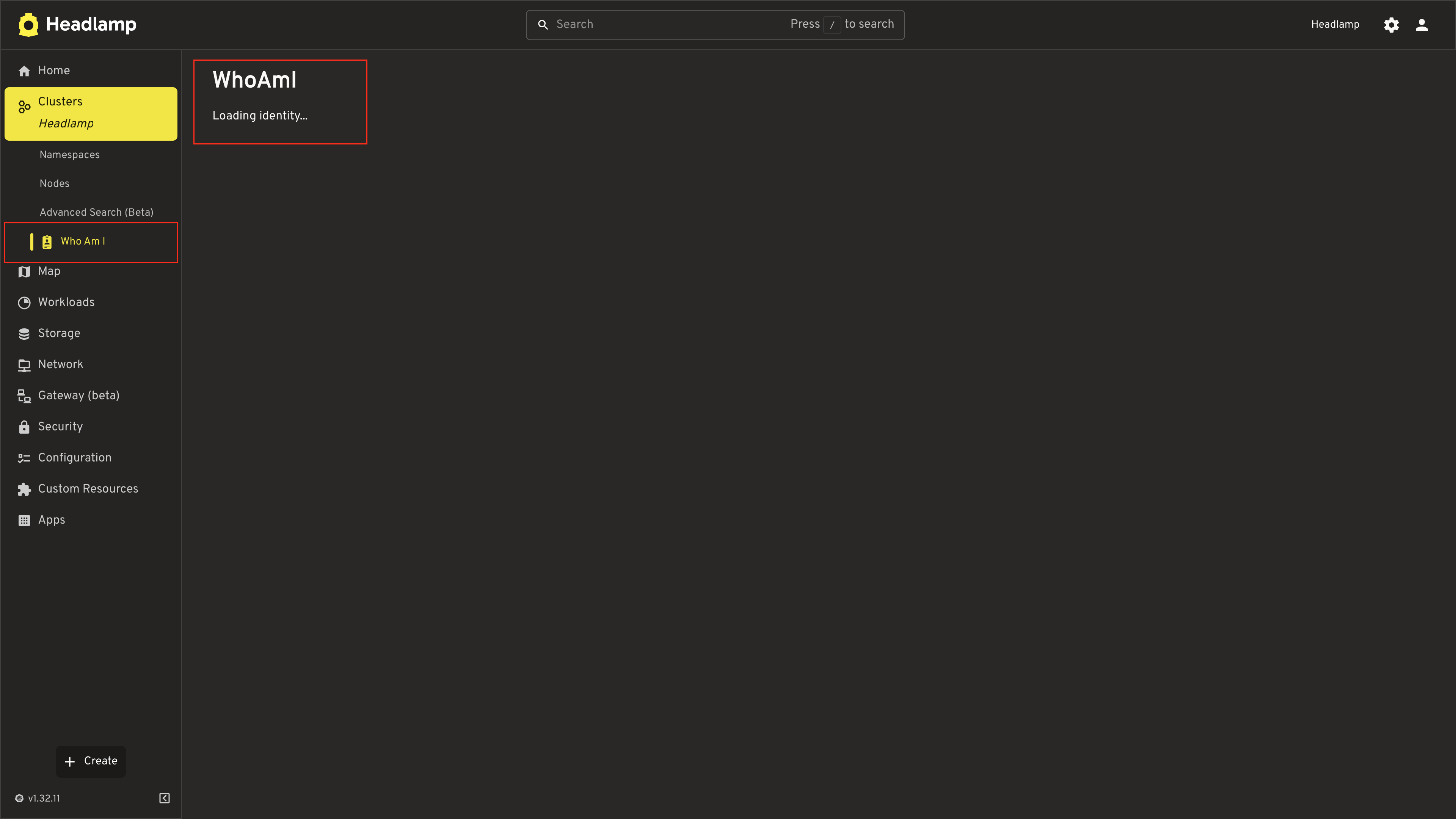
- Save the file
- Navigate to a cluster in Headlamp
- Expand the Cluster section in the sidebar
- You should see WhoAmI alongside Namespaces and Nodes
- Click it — you'll see the placeholder page
Fetch User Identity
Now let's call the Kubernetes SelfSubjectReview API to get the current user's identity. This is the same API that kubectl auth whoami uses.
The API works by sending a POST request to /apis/authentication.k8s.io/v1/selfsubjectreviews with an empty body, and the server responds with the authenticated user's info.
Update src/index.tsx:
import { useState, useEffect } from 'react';
import {
  ApiProxy,
  registerRoute,
  registerSidebarEntry,
} from '@kinvolk/headlamp-plugin/lib';
import { getCluster } from '@kinvolk/headlamp-plugin/lib/Utils';
import { SectionBox } from '@kinvolk/headlamp-plugin/lib/CommonComponents';
import { Typography, CircularProgress, Box } from '@mui/material';

// Type for the SelfSubjectReview response
interface UserInfo {
  username: string;
  uid?: string;
  groups?: string[];
  extra?: Record<string, string[]>;
}

function WhoAmIPage() {
  const cluster = getCluster();
  const [userInfo, setUserInfo] = useState<UserInfo>();
  const [error, setError] = useState<string | null>(null);

  useEffect(() => {
    async function fetchIdentity() {
      if (!cluster) return;

      try {
        const response = await ApiProxy.request(
          '/apis/authentication.k8s.io/v1/selfsubjectreviews',
          {
            cluster,
            method: 'POST',
            body: JSON.stringify({
              apiVersion: 'authentication.k8s.io/v1',
              kind: 'SelfSubjectReview',
            }),
            headers: {
              'Content-Type': 'application/json',
            },
          }
        );
        setUserInfo(response.status?.userInfo);
      } catch (err) {
        setError(err instanceof Error ? err.message : 'Failed to fetch identity');
      }
    }

    fetchIdentity();
  }, [cluster]);

  if (error) {
    return (
      <SectionBox title="WhoAmI">
        <Typography color="error">{error}</Typography>
      </SectionBox>
    );
  }

  if (!userInfo) {
    return (
      <SectionBox title="WhoAmI">
        <Box sx={{ display: 'flex', alignItems: 'center', gap: 2 }}>
          <CircularProgress size={20} />
          <Typography>Loading identity...</Typography>
        </Box>
      </SectionBox>
    );
  }

  return (
    <SectionBox title="WhoAmI">
      <Typography>{userInfo.username}</Typography>
    </SectionBox>
  );
}

registerSidebarEntry({
  parent: 'cluster',
  name: 'whoami',
  label: 'Who Am I',
  url: '/whoami',
  icon: 'mdi:badge-account',
});

registerRoute({
  path: '/whoami',
  sidebar: 'whoami',
  component: WhoAmIPage,
  exact: true,
});
Key details about the API call:
| Parameter | Value | Why |
|---|---|---|
| Endpoint | /apis/authentication.k8s.io/v1/selfsubjectreviews | The SelfSubjectReview API endpoint |
| Method | POST | This API requires a POST, not a GET |
| Body | { apiVersion, kind } | Minimal required body — the server fills in the response |
cluster | From getCluster() | Routes the request to the correct cluster |
The response has this structure:
{
  "apiVersion": "authentication.k8s.io/v1",
  "kind": "SelfSubjectReview",
  "status": {
    "userInfo": {
      "username": "user@example.com",
      "uid": "abc-123-def",
      "groups": ["system:authenticated", "developers"],
      "extra": {
        "some-key": ["some-value"]
      }
    }
  }
}
Test It
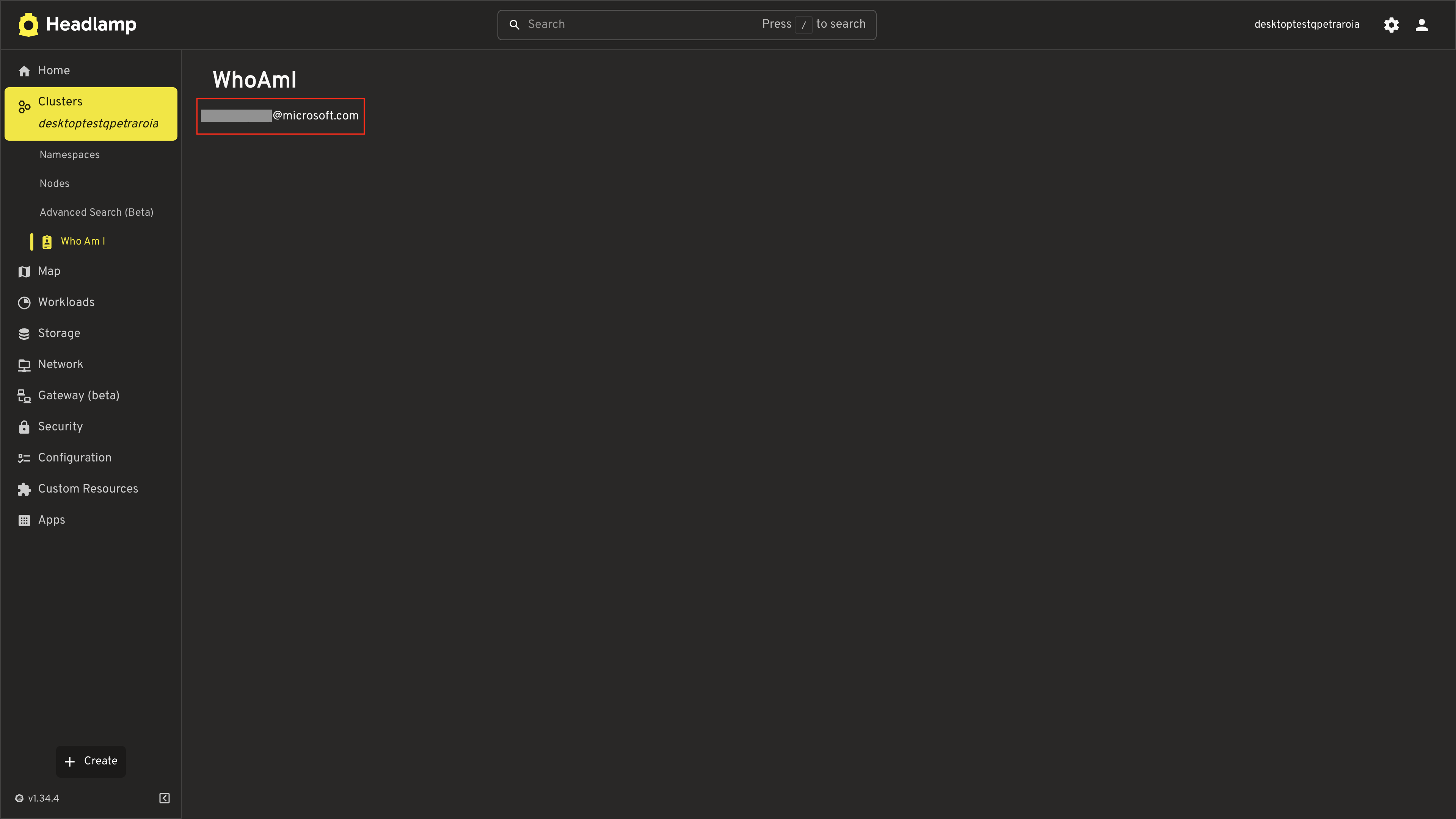
Save the file and click WhoAmI in the sidebar. You should see the username displayed. Now let's make it look better.
Note: The username format depends on your cluster's authentication provider. For example, Azure (AKS) typically shows your email address, minikube shows a client certificate CN, and OIDC providers may show a custom claim. This is expected — the API returns whatever identity the cluster sees for your requests.
Display the Identity
Let's use Headlamp's NameValueTable component to display the identity information cleanly, matching the style of built-in resource detail pages.
Update the WhoAmIPage component:
import { useState, useEffect } from 'react';
import {
  ApiProxy,
  registerRoute,
  registerSidebarEntry,
} from '@kinvolk/headlamp-plugin/lib';
import { getCluster } from '@kinvolk/headlamp-plugin/lib/Utils';
import {
  NameValueTable,
  SectionBox,
} from '@kinvolk/headlamp-plugin/lib/CommonComponents';
import { Typography, CircularProgress, Box, Chip } from '@mui/material';

interface UserInfo {
  username: string;
  uid?: string;
  groups?: string[];
  extra?: Record<string, string[]>;
}

function WhoAmIPage() {
  const cluster = getCluster();
  const [userInfo, setUserInfo] = useState<UserInfo>();
  const [error, setError] = useState<string | null>(null);

  useEffect(() => {
    async function fetchIdentity() {
      if (!cluster) return;

      try {
        const response = await ApiProxy.request(
          '/apis/authentication.k8s.io/v1/selfsubjectreviews',
          {
            cluster,
            method: 'POST',
            body: JSON.stringify({
              apiVersion: 'authentication.k8s.io/v1',
              kind: 'SelfSubjectReview',
            }),
            headers: {
              'Content-Type': 'application/json',
            },
          }
        );
        setUserInfo(response.status?.userInfo);
      } catch (err) {
        setError(err instanceof Error ? err.message : 'Failed to fetch identity');
      }
    }

    fetchIdentity();
  }, [cluster]);

  if (error) {
    return (
      <SectionBox title="WhoAmI">
        <Typography color="error">{error}</Typography>
      </SectionBox>
    );
  }

  if (!userInfo) {
    return (
      <SectionBox title="WhoAmI">
        <Box sx={{ display: 'flex', alignItems: 'center', gap: 2 }}>
          <CircularProgress size={20} />
          <Typography>Loading identity...</Typography>
        </Box>
      </SectionBox>
    );
  }

  // Build the rows for the NameValueTable
  const rows = [
    {
      name: 'Username',
      value: userInfo.username,
    },
    {
      name: 'UID',
      value: userInfo.uid || 'N/A',
    },
    {
      name: 'Groups',
      value: (
        <Box sx={{ display: 'flex', flexWrap: 'wrap', gap: 0.5 }}>
          {userInfo.groups?.map(group => (
            <Chip key={group} label={group} size="small" variant="outlined" />
          )) || 'None'}
        </Box>
      ),
    },
  ];

  // Add extra fields if present
  if (userInfo.extra && Object.keys(userInfo.extra).length > 0) {
    Object.entries(userInfo.extra).forEach(([key, values]) => {
      rows.push({
        name: key,
        value: (
          <Box sx={{ display: 'flex', flexWrap: 'wrap', gap: 0.5 }}>
            {values.map(v => (
              <Chip key={v} label={v} size="small" variant="outlined" />
            ))}
          </Box>
        ),
      });
    });
  }

  return (
    <SectionBox title="WhoAmI">
      <NameValueTable rows={rows} />
    </SectionBox>
  );
}

registerSidebarEntry({
  parent: 'cluster',
  name: 'whoami',
  label: 'Who Am I',
  url: '/whoami',
  icon: 'mdi:badge-account',
});

registerRoute({
  path: '/whoami',
  sidebar: 'whoami',
  component: WhoAmIPage,
  exact: true,
});
What's new?
| Component | Purpose |
|---|---|
NameValueTable | Headlamp's built-in key-value display, matching the style of resource detail pages |
Chip | MUI component for displaying groups as tags |
| Extra fields | Dynamically renders any additional identity attributes the API returns |
Test It
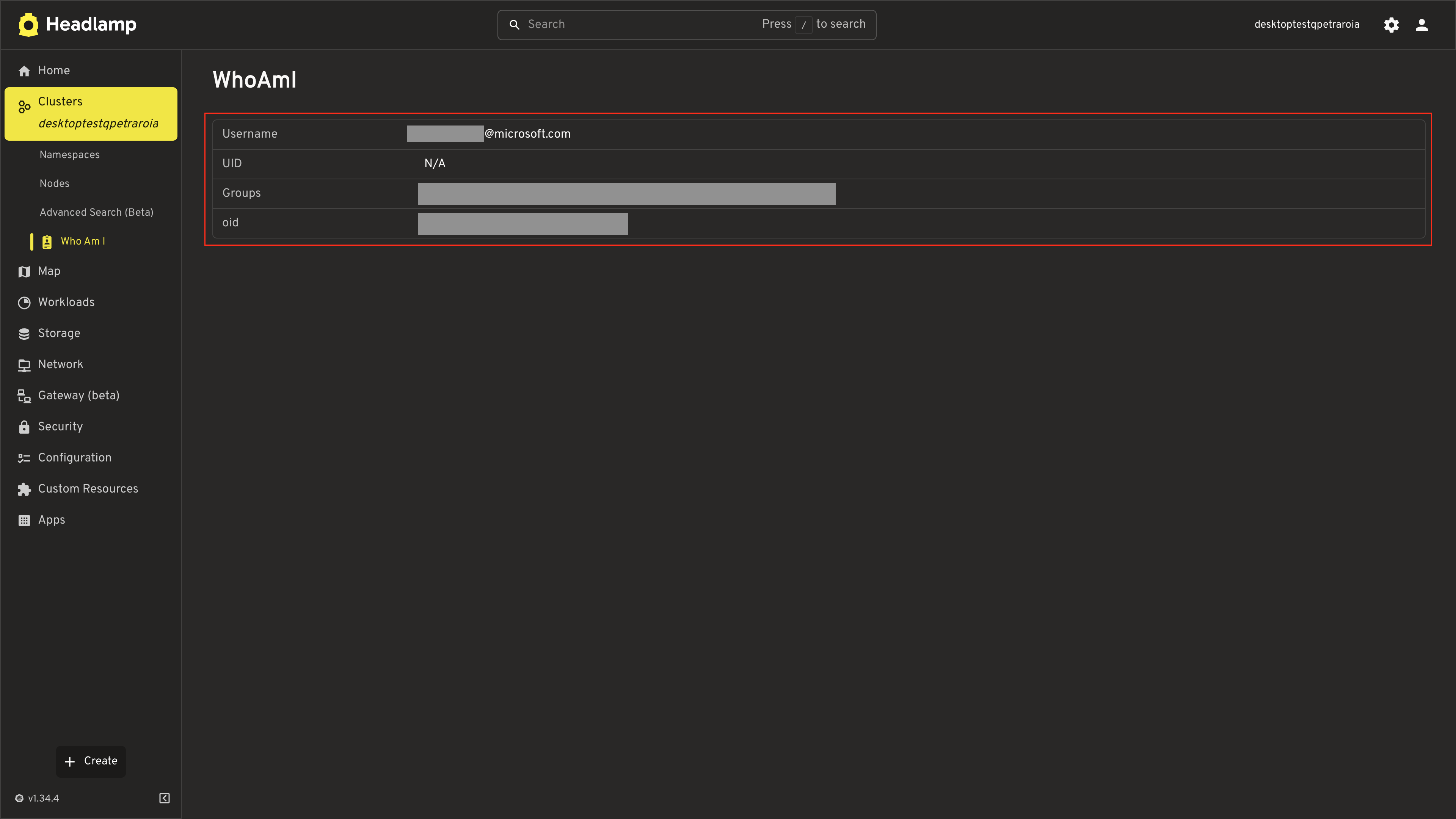
Save the file and navigate to the WhoAmI page. You should see a clean table showing:
- Username — your authenticated identity
- UID — your unique identifier (if available)
- Groups — displayed as chips (e.g.,
system:authenticated,system:masters) - Extra — any additional attributes (varies by authentication provider)
Supporting Multi-Cluster
Our plugin works, but there's a problem: it uses getCluster(), which returns only a single cluster name. Headlamp supports multi-cluster views where users can select and work with several clusters at once. If a user has multiple clusters selected, our plugin will only show the identity for one of them.
This is a common oversight in plugin development. Let's fix it by using the useSelectedClusters() hook, which returns all currently selected clusters.
getCluster() | useSelectedClusters() | |
|---|---|---|
| Returns | Single cluster name (string | null) | All selected clusters (string[]) |
| Multi-cluster | Only sees the first/primary cluster | Sees every cluster the user selected |
Update the Plugin
Replace the contents of src/index.tsx with the multi-cluster version:
import { useState, useEffect } from 'react';
import {
  ApiProxy,
  registerRoute,
  registerSidebarEntry,
} from '@kinvolk/headlamp-plugin/lib';
import { useSelectedClusters } from '@kinvolk/headlamp-plugin/lib/k8s';
import {
  NameValueTable,
  SectionBox,
} from '@kinvolk/headlamp-plugin/lib/CommonComponents';
import { Typography, CircularProgress, Box, Chip } from '@mui/material';

interface UserInfo {
  username: string;
  uid?: string;
  groups?: string[];
  extra?: Record<string, string[]>;
}

// Fetches identity for a single cluster
async function fetchClusterIdentity(cluster: string): Promise<UserInfo> {
  const response = await ApiProxy.request(
    '/apis/authentication.k8s.io/v1/selfsubjectreviews',
    {
      cluster,
      method: 'POST',
      body: JSON.stringify({
        apiVersion: 'authentication.k8s.io/v1',
        kind: 'SelfSubjectReview',
      }),
      headers: {
        'Content-Type': 'application/json',
      },
    }
  );
  return response.status?.userInfo;
}

// Renders the identity table for a single cluster
function ClusterIdentity({
  cluster,
  userInfo,
  error,
}: {
  cluster: string;
  userInfo?: UserInfo;
  error?: string;
}) {
  if (error) {
    return (
      <SectionBox title={`WhoAmI — ${cluster}`}>
        <Typography color="error">{error}</Typography>
      </SectionBox>
    );
  }

  if (!userInfo) return null;

  const rows = [
    { name: 'Username', value: userInfo.username },
    { name: 'UID', value: userInfo.uid || 'N/A' },
    {
      name: 'Groups',
      value: (
        <Box sx={{ display: 'flex', flexWrap: 'wrap', gap: 0.5 }}>
          {userInfo.groups?.map(group => (
            <Chip key={group} label={group} size="small" variant="outlined" />
          )) || 'None'}
        </Box>
      ),
    },
  ];

  if (userInfo.extra && Object.keys(userInfo.extra).length > 0) {
    Object.entries(userInfo.extra).forEach(([key, values]) => {
      rows.push({
        name: key,
        value: (
          <Box sx={{ display: 'flex', flexWrap: 'wrap', gap: 0.5 }}>
            {values.map(v => (
              <Chip key={v} label={v} size="small" variant="outlined" />
            ))}
          </Box>
        ),
      });
    });
  }

  return (
    <SectionBox title={`WhoAmI — ${cluster}`}>
      <NameValueTable rows={rows} />
    </SectionBox>
  );
}

function WhoAmIPage() {
  // useSelectedClusters() returns all clusters the user currently has selected,
  // supporting Headlamp's multi-cluster feature.
  const selectedClusters = useSelectedClusters();
  const [clusterIdentities, setClusterIdentities] = useState<
    Record<string, { userInfo?: UserInfo; error?: string }>
  >({});
  const [loading, setLoading] = useState(true);

  useEffect(() => {
    if (selectedClusters.length === 0) {
      setLoading(false);
      return;
    }

    async function fetchIdentities() {
      setLoading(true);
      const results: Record<string, { userInfo?: UserInfo; error?: string }> = {};

      // Fetch identity for all selected clusters in parallel
      await Promise.all(
        selectedClusters.map(async cluster => {
          try {
            const userInfo = await fetchClusterIdentity(cluster);
            results[cluster] = { userInfo };
          } catch (err) {
            results[cluster] = {
              error: err instanceof Error ? err.message : 'Failed to fetch identity',
            };
          }
        })
      );

      setClusterIdentities(results);
      setLoading(false);
    }

    fetchIdentities();
  }, [selectedClusters.join(',')]);

  if (loading) {
    return (
      <SectionBox title="WhoAmI">
        <Box sx={{ display: 'flex', alignItems: 'center', gap: 2 }}>
          <CircularProgress size={20} />
          <Typography>Loading identity...</Typography>
        </Box>
      </SectionBox>
    );
  }

  if (selectedClusters.length === 0) {
    return (
      <SectionBox title="WhoAmI">
        <Typography>No cluster selected.</Typography>
      </SectionBox>
    );
  }

  return (
    <>
      {selectedClusters.map(cluster => (
        <ClusterIdentity
          key={cluster}
          cluster={cluster}
          {...clusterIdentities[cluster]}
        />
      ))}
    </>
  );
}

registerSidebarEntry({
  parent: 'cluster',
  name: 'whoami',
  label: 'Who Am I',
  url: '/whoami',
  icon: 'mdi:badge-account',
});

registerRoute({
  path: '/whoami',
  sidebar: 'whoami',
  component: WhoAmIPage,
  exact: true,
});
What changed?
| Change | Why |
|---|---|
getCluster() → useSelectedClusters() | Gets all selected clusters instead of just one |
Import from lib/k8s instead of lib/Utils | useSelectedClusters is exported from the K8s module |
fetchClusterIdentity() helper | Extracted so we can call it once per cluster |
ClusterIdentity component | Renders one identity section — reused for each cluster |
Promise.all(...) | Fetches identities for all clusters in parallel |
SectionBox title={WhoAmI — ${cluster}} | Labels each section with the cluster name so users can tell them apart |
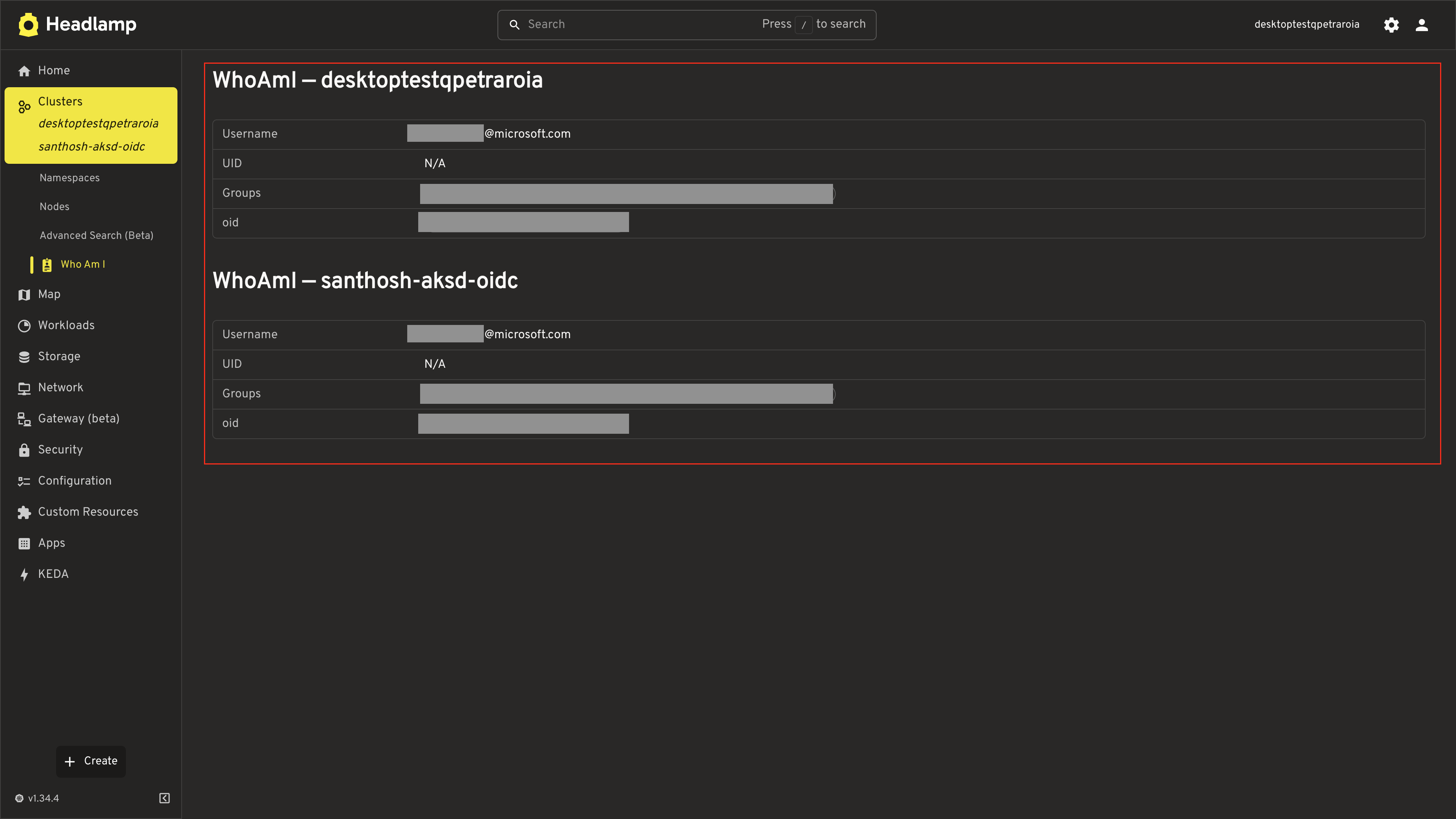
With a single cluster selected, the page looks exactly like before (just with the cluster name in the title). With multiple clusters, users see one section per cluster — matching how Headlamp's built-in list pages show resources across clusters.
Test It
- Save the file
- With a single cluster selected, the page should work as before
- If you have multiple clusters configured, select more than one using the cluster chooser in the top bar — you should see a separate identity section for each cluster
Troubleshooting
"Failed to fetch identity" Error
Check your Kubernetes version:
The SelfSubjectReview API requires Kubernetes >= 1.28. Check your version:
kubectl version --short
If your cluster is older, the API won't be available.
Check RBAC permissions:
The SelfSubjectReview API is available to all authenticated users by default. If you see a 403 error, your cluster may have non-standard RBAC policies.
Sidebar Entry Not Under Cluster
Verify parent: 'cluster':
The entry must use parent: 'cluster' (lowercase) to appear under the Cluster section alongside Namespaces and Nodes:
registerSidebarEntry({
  parent: 'cluster',    // Must be exactly 'cluster'
  name: 'whoami',
  // ...
});
UID Shows "N/A"
Some authentication providers don't set a UID. This is normal — not all identity systems provide one. The username and groups are the primary identity attributes.
Groups or Extra Fields Empty
The groups and extra fields depend on your authentication provider:
| Auth Method | Typical Groups | Extra Fields |
|---|---|---|
| Client certificate | system:masters, system:authenticated | None |
| OIDC | system:authenticated, custom groups | Varies by provider |
| Service account | system:serviceaccounts, namespace groups | None |
| Token webhook | Depends on provider | Depends on provider |
Quick Reference
SelfSubjectReview API
const response = await ApiProxy.request(
  '/apis/authentication.k8s.io/v1/selfsubjectreviews',
  {
    cluster,
    method: 'POST',
    body: JSON.stringify({
      apiVersion: 'authentication.k8s.io/v1',
      kind: 'SelfSubjectReview',
    }),
    headers: {
      'Content-Type': 'application/json',
    },
  }
);

const userInfo = response.status?.userInfo;
// userInfo.username  — string
// userInfo.uid       — string | undefined
// userInfo.groups    — string[] | undefined
// userInfo.extra     — Record<string, string[]> | undefined
Sidebar Under Cluster
registerSidebarEntry({
  parent: 'cluster',           // Places entry under Cluster (alongside Namespaces, Nodes)
  name: 'whoami',
  label: 'Who Am I',
  url: '/whoami',
  icon: 'mdi:badge-account',
});
Key Concepts Used
| Concept | From Tutorial | Applied Here |
|---|---|---|
registerSidebarEntry with parent | Tutorial 3 | Sidebar entry under Cluster |
registerRoute | Tutorial 3 | WhoAmI page route |
ApiProxy.request with POST | Tutorial 4 | SelfSubjectReview API call |
NameValueTable | Tutorial 6 | Identity display |
getCluster() | Tutorial 4 | Cluster context |
Useful Links
- SelfSubjectReview API — Kubernetes API reference
- kubectl auth whoami — CLI equivalent
- Headlamp Plugin API — Plugin development docs