Working with Kubernetes Data
This tutorial teaches you how to fetch and display Kubernetes data in your plugin. You'll learn three different approaches: using cluster context, built-in resource classes, and direct API calls.
Table of Contents
- Introduction
- Understanding Cluster Context
- Using Built-in Resource Classes
- Fetching Single Resources
- Direct API Calls with ApiProxy
- Troubleshooting
- What's Next
- Quick Reference
Introduction
In Tutorial 3, you created pages with static content. Real plugins need to display live Kubernetes data like pods, deployments, nodes, etc.
This tutorial covers three ways to fetch Kubernetes data:
| Approach | Best For | Example |
|---|---|---|
getCluster() | Getting current cluster context | Display cluster name |
K8s.ResourceClasses | Standard Kubernetes resources | List namespaces, nodes |
ApiProxy.request() | Custom endpoints, raw API calls | Fetch API server version |
What You'll Build
By the end of this tutorial, your plugin will:
- Display the current cluster name
- Show a list of namespaces
- List namespaces as clickable buttons
- Display namespace details when clicked
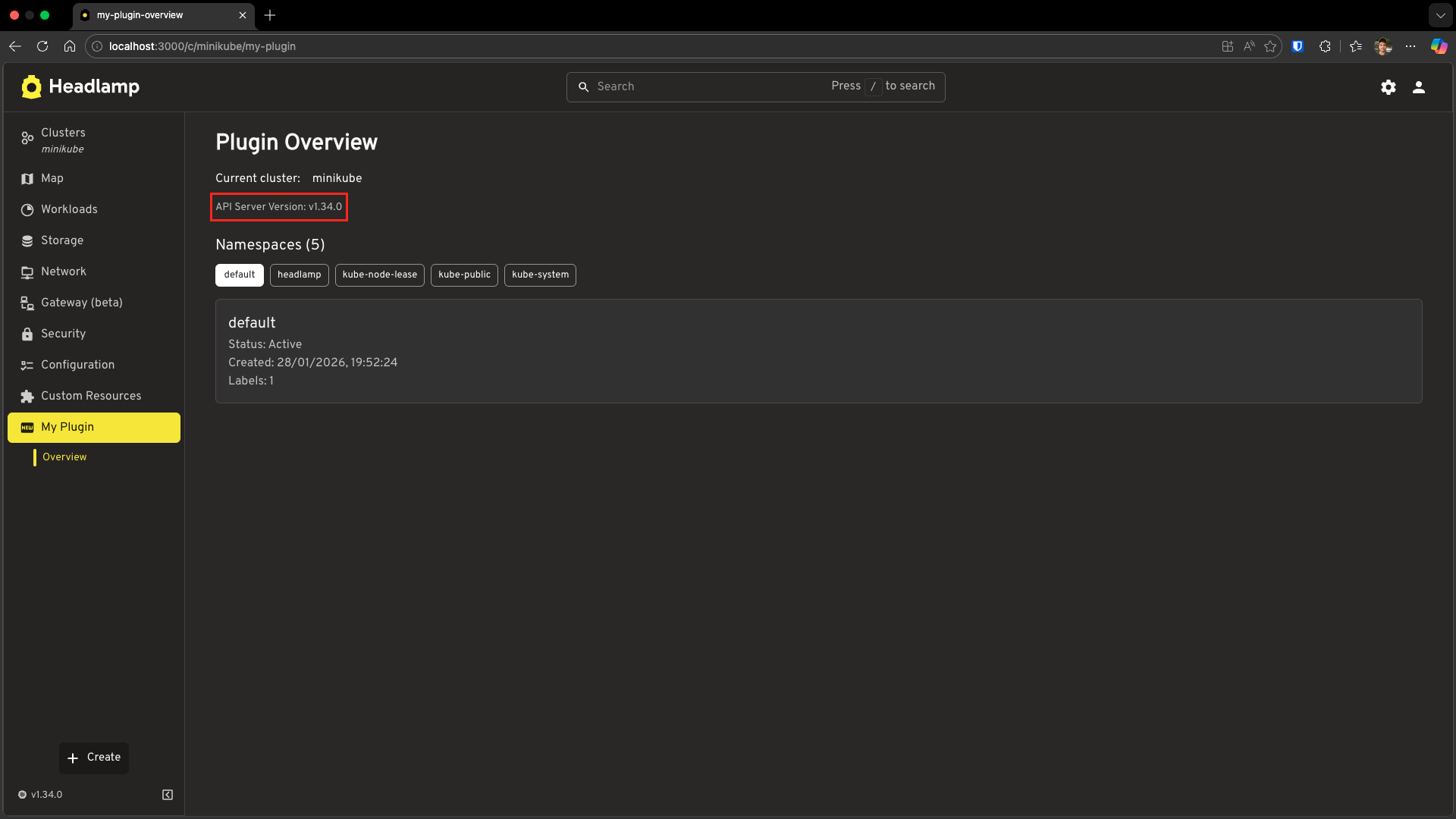
- Fetch and display API server version information
Prerequisites
Before starting, ensure you have:
- ✅ Completed Tutorial 3: Adding Pages and Sidebar Navigation
- ✅ Your
hello-headlampplugin ready - ✅ Headlamp running with a connected cluster (minikube, kind, or any Kubernetes cluster)
Time to complete: ~25 minutes
Understanding Cluster Context
When a user navigates to a cluster-specific page, your plugin needs to know which cluster they're viewing. Headlamp provides the getCluster() utility for this.
Display the Current Cluster
Let's update your Overview page to show the current cluster name.
Open src/index.tsx and update it:
import {
  registerRoute,
  registerSidebarEntry,
} from '@kinvolk/headlamp-plugin/lib';
import { getCluster } from '@kinvolk/headlamp-plugin/lib/Utils';
import { SectionBox } from '@kinvolk/headlamp-plugin/lib/CommonComponents';
import { Typography, Box } from '@mui/material';

function OverviewPage() {
  const cluster = getCluster();

  return (
    <SectionBox title="Plugin Overview">
      <Box sx={{ display: 'flex', alignItems: 'center', gap: 2 }}>
        <Typography>Current cluster:</Typography>
        {cluster ? <>{cluster}</> : <>{'N/A'}</>}
      </Box>
    </SectionBox>
  );
}

// Register the route (cluster view)
registerRoute({
  path: '/my-plugin',
  sidebar: 'my-plugin-overview',
  component: OverviewPage,
  exact: true,
});

// Register sidebar entries
registerSidebarEntry({
  name: 'my-plugin',
  label: 'My Plugin',
  icon: 'mdi:new-box',
  url: '/my-plugin',
});

registerSidebarEntry({
  parent: 'my-plugin',
  name: 'my-plugin-overview',
  label: 'Overview',
  url: '/my-plugin',
});
Test It
- Save the file
- Navigate to a cluster in Headlamp
- Click My Plugin → Overview in the sidebar
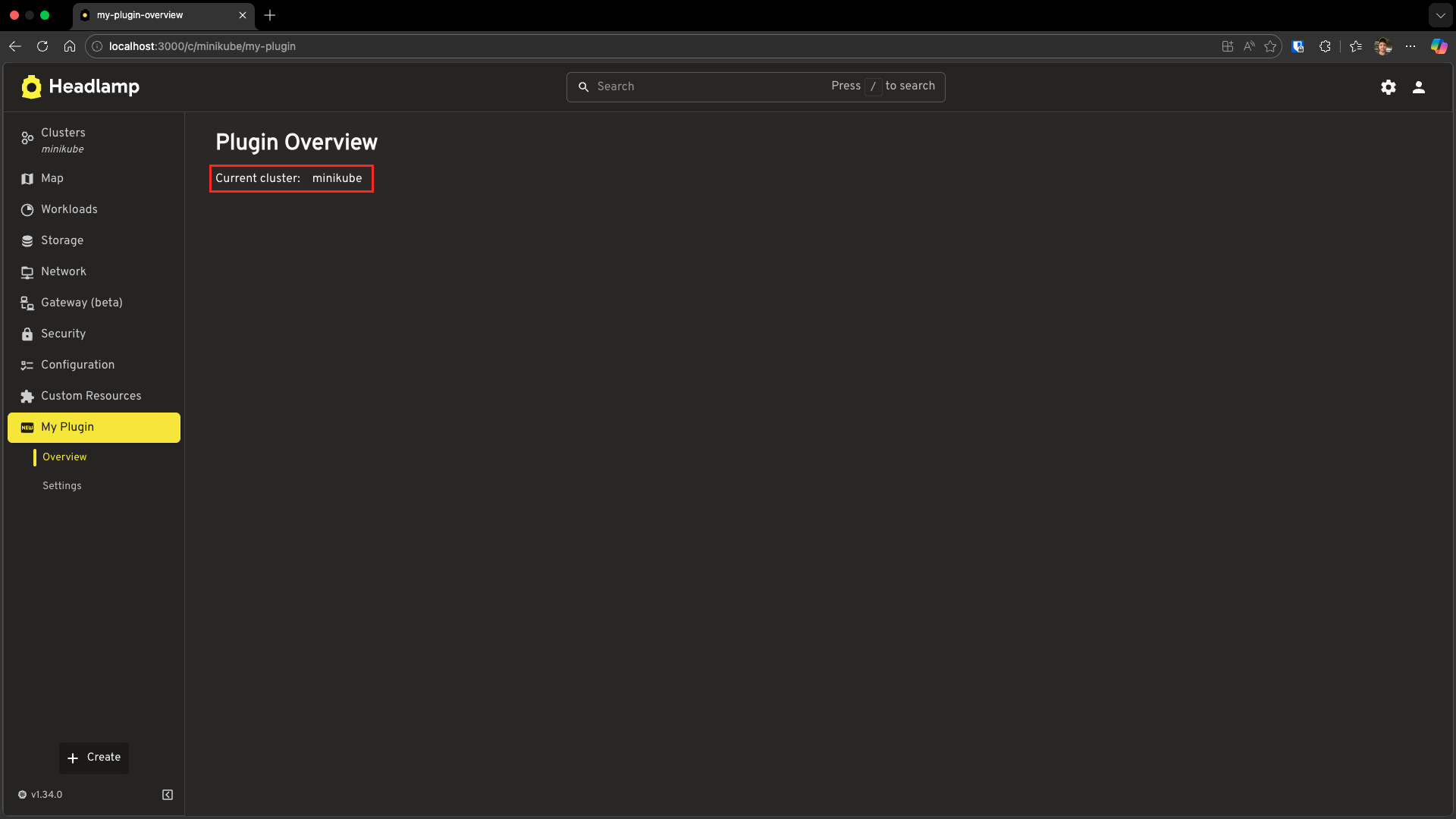
- You should see the cluster name displayed!
What's happening?
| Code | Purpose |
|---|---|
getCluster() | Returns the current cluster name from the URL (e.g., minikube) |
Returns null | When not in a cluster context (home view) |
Note:
getCluster()reads the cluster from the URL path (/c/:cluster/...). It only works on cluster-specific pages whereuseClusterURL: true(the default).
Using Built-in Resource Classes
Now let's fetch actual Kubernetes resources. Headlamp provides K8s.ResourceClasses with built-in hooks for all standard Kubernetes resources including Pod, Namespace, Node, Deployment, Service, ConfigMap, Secret, and many more.
📚 Full list: See ResourceClasses API Reference for all available resource classes.
Each class provides two hooks:
useList()— Fetch multiple resourcesuseGet(name, namespace?)— Fetch a single resource
List Namespaces
Let's display all namespaces in the cluster. Update your src/index.tsx:
import {
  K8s,
  registerRoute,
  registerSidebarEntry,
} from '@kinvolk/headlamp-plugin/lib';
import { getCluster } from '@kinvolk/headlamp-plugin/lib/Utils';
import { SectionBox } from '@kinvolk/headlamp-plugin/lib/CommonComponents';
import {
  Typography,
  Box,
  CircularProgress,
  List,
  ListItem,
  ListItemText,
} from '@mui/material';

function OverviewPage() {
  const cluster = getCluster();

  // Fetch all namespaces
  const [namespaces, namespacesError] = K8s.ResourceClasses.Namespace.useList();

  // Loading state
  if (!namespaces && !namespacesError) {
    return (
      <SectionBox title="Plugin Overview">
        <Box sx={{ display: 'flex', alignItems: 'center', gap: 2 }}>
          <CircularProgress size={20} />
          <Typography>Loading namespaces...</Typography>
        </Box>
      </SectionBox>
    );
  }

  // Error state
  if (namespacesError) {
    return (
      <SectionBox title="Plugin Overview">
        <Typography color="error">
          Error loading namespaces: {namespacesError.message}
        </Typography>
      </SectionBox>
    );
  }

  return (
    <SectionBox title="Plugin Overview">
      <Box sx={{ display: 'flex', alignItems: 'center', gap: 2, mb: 3 }}>
        <Typography>Current cluster:</Typography>
        {cluster ? <>{cluster}</> : <>{'N/A'}</>}
      </Box>

      <Typography variant="h6" sx={{ mb: 1 }}>
        Namespaces ({namespaces?.length || 0})
      </Typography>

      <List dense>
        {namespaces?.slice(0, 5).map(ns => (
          <ListItem key={ns.metadata.name}>
            <ListItemText
              primary={ns.metadata.name}
              secondary={`Created: ${new Date(
                ns.metadata.creationTimestamp
              ).toLocaleDateString()}`}
            />
          </ListItem>
        ))}
        {namespaces && namespaces.length > 5 && (
          <ListItem>
            <ListItemText
              secondary={`... and ${namespaces.length - 5} more`}
            />
          </ListItem>
        )}
      </List>
    </SectionBox>
  );
}

registerRoute({
  path: '/my-plugin',
  sidebar: 'my-plugin-overview',
  component: OverviewPage,
  exact: true,
});

registerSidebarEntry({
  name: 'my-plugin',
  label: 'My Plugin',
  icon: 'mdi:new-box',
  url: '/my-plugin',
});

registerSidebarEntry({
  parent: 'my-plugin',
  name: 'my-plugin-overview',
  label: 'Overview',
  url: '/my-plugin',
});
Test It
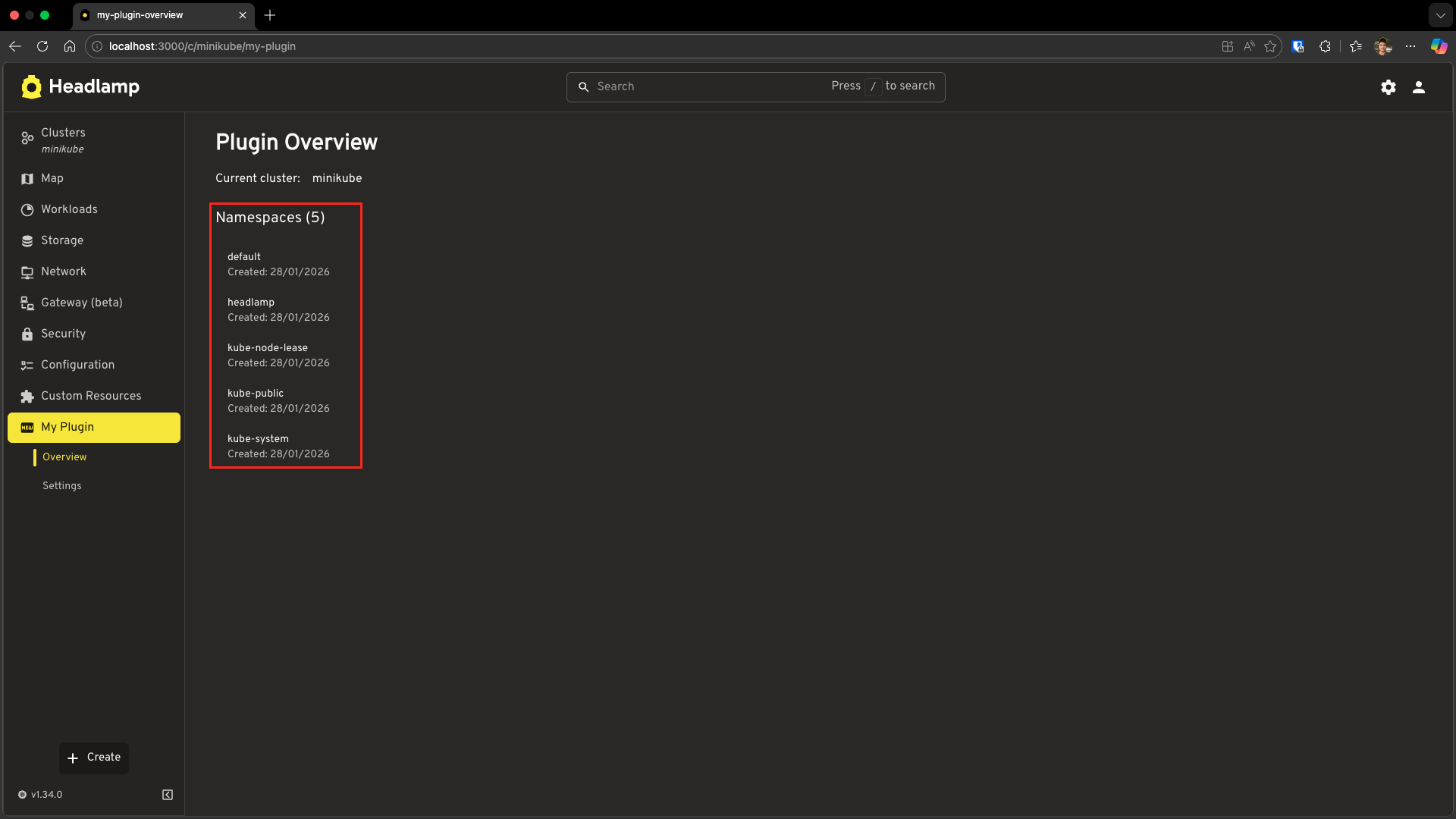
Save and navigate to your plugin page. You should see:
- The cluster name
- A count of namespaces
- The first 5 namespaces listed
Understanding the useList Hook
const [namespaces, error] = K8s.ResourceClasses.Namespace.useList();
| Return Value | Type | Description |
|---|---|---|
namespaces | Namespace[] | null | Array of namespace objects, or null while loading |
error | Error | null | Error object if the request failed |
The Three States:
// Loading: data is null, no error
if (!namespaces && !namespacesError) {
  return <Loading />;
}

// Error: request failed
if (namespacesError) {
  return <Error message={namespacesError.message} />;
}

// Success: data is available
return <DisplayData namespaces={namespaces} />;
Fetching Single Resources
Sometimes you need to fetch a specific resource by name. Use useGet() for this.
Add Namespace Details
Let's enhance our OverviewPage to show details when a namespace is clicked. Update your src/index.tsx:
import { useState } from 'react';
import {
  K8s,
  registerRoute,
  registerSidebarEntry,
} from '@kinvolk/headlamp-plugin/lib';
import { getCluster } from '@kinvolk/headlamp-plugin/lib/Utils';
import { SectionBox } from '@kinvolk/headlamp-plugin/lib/CommonComponents';
import {
  Typography,
  Box,
  CircularProgress,
  Button,
  Paper,
} from '@mui/material';

// Component to show details of a selected namespace
function NamespaceDetail({ namespace }: { namespace: string }) {
  // Fetch a single namespace by name using useGet()
  const [ns, nsError] = K8s.ResourceClasses.Namespace.useGet(namespace);

  if (!ns && !nsError) {
    return <CircularProgress size={20} />;
  }

  if (nsError) {
    return <Typography color="error">Namespace not found</Typography>;
  }

  return (
    <Paper variant="outlined" sx={{ p: 2 }}>
      <Typography variant="h6">{ns.metadata.name}</Typography>
      <Typography color="text.secondary">
        Status: {ns.status?.phase}
      </Typography>
      <Typography color="text.secondary">
        Created: {new Date(ns.metadata.creationTimestamp).toLocaleString()}
      </Typography>
      <Typography color="text.secondary">
        Labels: {Object.keys(ns.metadata.labels || {}).length}
      </Typography>
    </Paper>
  );
}

function OverviewPage() {
  const cluster = getCluster();
  const [selectedNamespace, setSelectedNamespace] = useState<string | null>(null);

  // Fetch all namespaces using useList()
  const [namespaces, namespacesError] = K8s.ResourceClasses.Namespace.useList();

  if (!namespaces && !namespacesError) {
    return (
      <SectionBox title="Plugin Overview">
        <Box sx={{ display: 'flex', alignItems: 'center', gap: 2 }}>
          <CircularProgress size={20} />
          <Typography>Loading namespaces...</Typography>
        </Box>
      </SectionBox>
    );
  }

  if (namespacesError) {
    return (
      <SectionBox title="Plugin Overview">
        <Typography color="error">
          Error loading namespaces: {namespacesError.message}
        </Typography>
      </SectionBox>
    );
  }

  return (
    <SectionBox title="Plugin Overview">
      <Box sx={{ display: 'flex', alignItems: 'center', gap: 2, mb: 3 }}>
        <Typography>Current cluster:</Typography>
        {cluster ? <>{cluster}</> : <>{'N/A'}</>}
      </Box>

      <Typography variant="h6" sx={{ mb: 1 }}>
        Namespaces ({namespaces?.length || 0})
      </Typography>

      {/* Namespace buttons - click to see details */}
      <Box sx={{ display: 'flex', flexWrap: 'wrap', gap: 1, mb: 2 }}>
        {namespaces?.slice(0, 5).map(ns => (
          <Button
            key={ns.metadata.name}
            variant={selectedNamespace === ns.metadata.name ? 'contained' : 'outlined'}
            size="small"
            onClick={() => setSelectedNamespace(ns.metadata.name)}
          >
            {ns.metadata.name}
          </Button>
        ))}
      </Box>

      {/* Show details when a namespace is selected */}
      {selectedNamespace && (
        <NamespaceDetail namespace={selectedNamespace} />
      )}
    </SectionBox>
  );
}

registerRoute({
  path: '/my-plugin',
  sidebar: 'my-plugin-overview',
  component: OverviewPage,
  exact: true,
});

registerSidebarEntry({
  name: 'my-plugin',
  label: 'My Plugin',
  icon: 'mdi:new-box',
  url: '/my-plugin',
});

registerSidebarEntry({
  parent: 'my-plugin',
  name: 'my-plugin-overview',
  label: 'Overview',
  url: '/my-plugin',
});
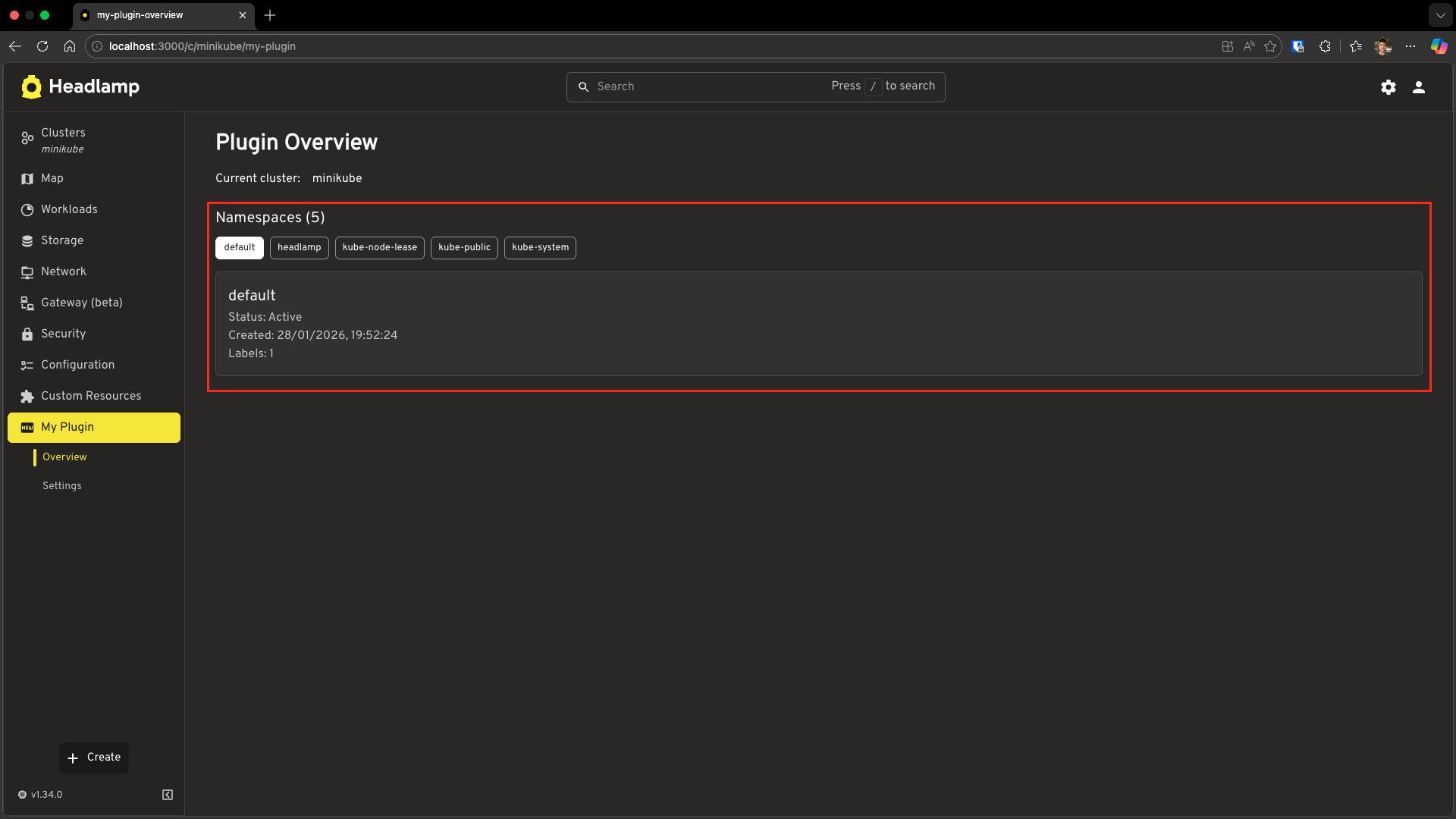
What changed from the previous example:
| Addition | Purpose |
|---|---|
useState for selectedNamespace | Track which namespace is selected |
NamespaceDetail component | Uses useGet() to fetch single namespace |
Button instead of List | Clickable namespace selection |
| Conditional render | Only show details when a namespace is selected |
useGet Signature:
| Resource Type | Signature | Example |
|---|---|---|
| Cluster-scoped | useGet(name) | Node.useGet('node-1') |
| Namespaced | useGet(name, namespace) | Pod.useGet('nginx', 'default') |
Direct API Calls with ApiProxy
Sometimes you need to call Kubernetes APIs that don't have a built-in resource class, or you want more control over the request. ApiProxy provides direct access to the Kubernetes API server.
Example: Add API Server Version to Overview Page
Let's enhance our OverviewPage to also display the Kubernetes API server version using ApiProxy.request(). This builds on the previous example:
import { useState, useEffect } from 'react';
import {
  ApiProxy,
  K8s,
  registerRoute,
  registerSidebarEntry,
} from '@kinvolk/headlamp-plugin/lib';
import { getCluster } from '@kinvolk/headlamp-plugin/lib/Utils';
import { SectionBox } from '@kinvolk/headlamp-plugin/lib/CommonComponents';
import {
  Typography,
  Box,
  CircularProgress,
  Button,
  Paper,
} from '@mui/material';

// Component to show details of a selected namespace
function NamespaceDetail({ namespace }: { namespace: string }) {
  const [ns, nsError] = K8s.ResourceClasses.Namespace.useGet(namespace);

  if (!ns && !nsError) {
    return <CircularProgress size={20} />;
  }

  if (nsError) {
    return <Typography color="error">Namespace not found</Typography>;
  }

  return (
    <Paper variant="outlined" sx={{ p: 2 }}>
      <Typography variant="h6">{ns.metadata.name}</Typography>
      <Typography color="text.secondary">
        Status: {ns.status?.phase}
      </Typography>
      <Typography color="text.secondary">
        Created: {new Date(ns.metadata.creationTimestamp).toLocaleString()}
      </Typography>
      <Typography color="text.secondary">
        Labels: {Object.keys(ns.metadata.labels || {}).length}
      </Typography>
    </Paper>
  );
}

function OverviewPage() {
  const cluster = getCluster();
  const [selectedNamespace, setSelectedNamespace] = useState<string | null>(null);
  const [versionInfo, setVersionInfo] = useState<{ gitVersion?: string } | null>(null);

  // Fetch all namespaces using useList()
  const [namespaces, namespacesError] = K8s.ResourceClasses.Namespace.useList();

  // Fetch API server version using ApiProxy
  useEffect(() => {
    async function fetchVersion() {
      if (!cluster) return;

      try {
        const response = await ApiProxy.request('/version', {
          cluster: cluster,
        });
        setVersionInfo(response);
      } catch (err) {
        // Silently fail - version info is optional
        console.error('Failed to fetch version:', err);
      }
    }

    fetchVersion();
  }, [cluster]);

  if (!namespaces && !namespacesError) {
    return (
      <SectionBox title="Plugin Overview">
        <Box sx={{ display: 'flex', alignItems: 'center', gap: 2 }}>
          <CircularProgress size={20} />
          <Typography>Loading namespaces...</Typography>
        </Box>
      </SectionBox>
    );
  }

  if (namespacesError) {
    return (
      <SectionBox title="Plugin Overview">
        <Typography color="error">
          Error loading namespaces: {namespacesError.message}
        </Typography>
      </SectionBox>
    );
  }

  return (
    <SectionBox title="Plugin Overview">
      <Box sx={{ display: 'flex', alignItems: 'center', gap: 2, mb: 2 }}>
        <Typography>Current cluster:</Typography>
        {cluster ? <>{cluster}</> : <>{'N/A'}</>}
      </Box>

      {/* API Server Version Info - added using ApiProxy */}
      {versionInfo?.gitVersion && (
        <Box sx={{ mb: 3 }}>
          <Typography variant="body2" color="text.secondary">
            API Server Version: {versionInfo.gitVersion}
          </Typography>
        </Box>
      )}

      <Typography variant="h6" sx={{ mb: 1 }}>
        Namespaces ({namespaces?.length || 0})
      </Typography>

      {/* Namespace buttons - click to see details */}
      <Box sx={{ display: 'flex', flexWrap: 'wrap', gap: 1, mb: 2 }}>
        {namespaces?.slice(0, 5).map(ns => (
          <Button
            key={ns.metadata.name}
            variant={selectedNamespace === ns.metadata.name ? 'contained' : 'outlined'}
            size="small"
            onClick={() => setSelectedNamespace(ns.metadata.name)}
          >
            {ns.metadata.name}
          </Button>
        ))}
      </Box>

      {/* Show details when a namespace is selected */}
      {selectedNamespace && (
        <NamespaceDetail namespace={selectedNamespace} />
      )}
    </SectionBox>
  );
}

registerRoute({
  path: '/my-plugin',
  sidebar: 'my-plugin-overview',
  component: OverviewPage,
  exact: true,
});

registerSidebarEntry({
  name: 'my-plugin',
  label: 'My Plugin',
  icon: 'mdi:new-box',
  url: '/my-plugin',
});

registerSidebarEntry({
  parent: 'my-plugin',
  name: 'my-plugin-overview',
  label: 'Overview',
  url: '/my-plugin',
});
What's new:
- Added
ApiProxyimport anduseEffecthook - Added
versionInfostate to store API server version - Added
useEffectto fetch version when cluster changes - Display version info below cluster name
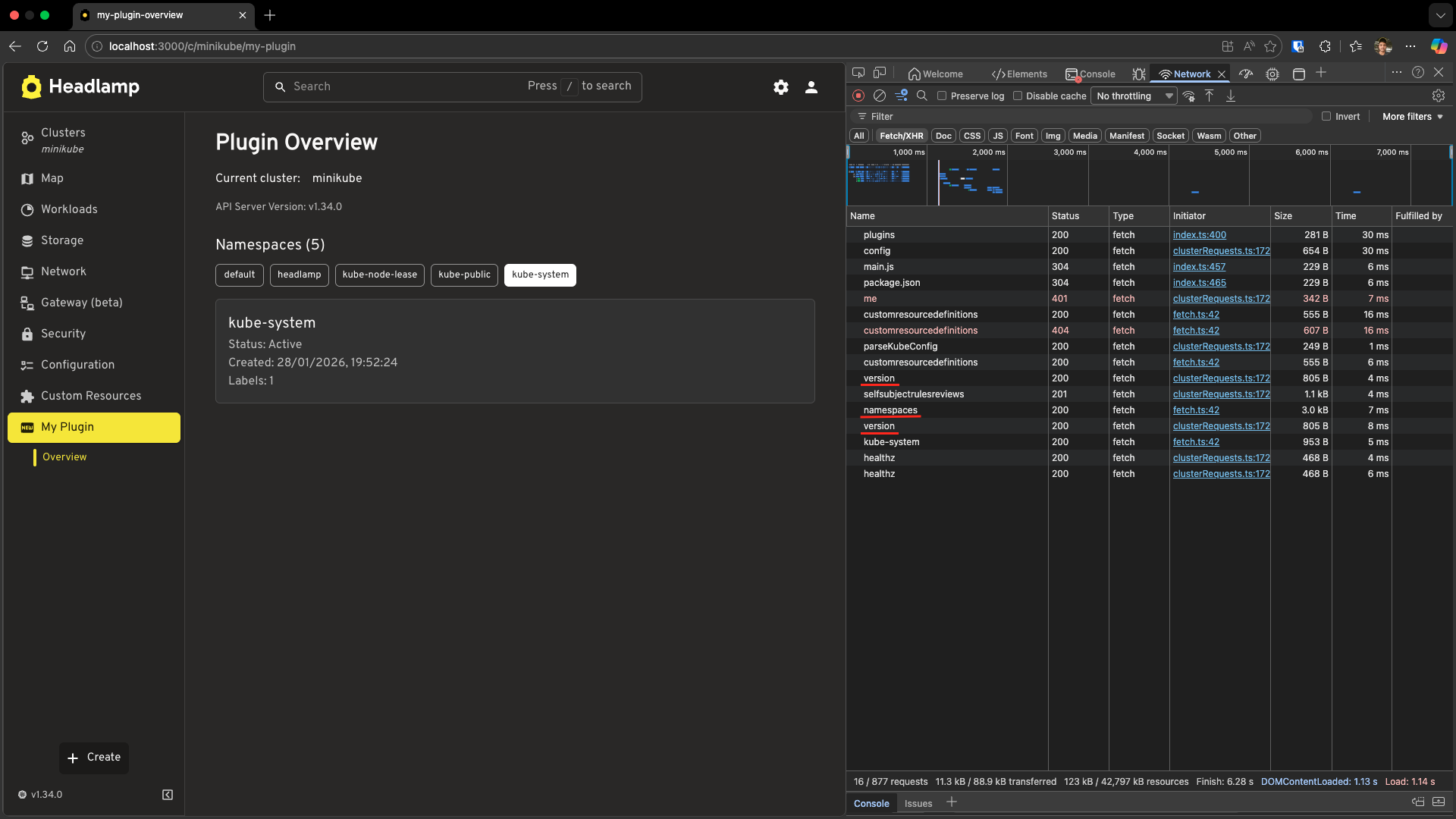
Explore the Network Requests
To better understand how these API calls work, let's inspect the network traffic:
- Open your browser's Developer Tools (F12 or right-click → Inspect)
- Go to the Network tab
- Refresh your plugin page or navigate to it
- Look for the API requests:
You should see requests like:
/api/v1/namespaces- This is theuseList()call fetching all namespaces/version- This is theApiProxy.request()call fetching API server version/api/v1/namespaces/{name}- This appears when you click a namespace (theuseGet()call)
Understanding ApiProxy.request
const response = await ApiProxy.request('/version', {
  cluster: cluster,
});
| Parameter | Description |
|---|---|
First arg: /version | The API endpoint path (relative to cluster API server) |
cluster option | Which cluster to send the request to |
Recommendations:
- Use
K8s.ResourceClassesfor standard Kubernetes resources—it handles caching, error handling, and real-time updates automatically - Use
ApiProxy.request()for custom endpoints or when you need full control - Always handle loading and error states for a good user experience
Troubleshooting
"No cluster selected" Error
Problem: getCluster() returns null
Solution: Make sure you're on a cluster-specific page:
- URL should be
/c/:cluster/your-path - Route should have
useClusterURL: true(default)
Data Not Loading
Check the console for errors:
- Open browser DevTools (F12)
- Look at the Console tab for error messages
- Check the Network tab for failed API requests
Common issues:
- RBAC permissions — User may not have permission to list resources
- Cluster connectivity — Check if Headlamp can reach the cluster
useList Returns Empty Array
Possible causes:
- The resource type doesn't exist in the cluster
- No resources of that type exist
- Filtered by namespace (for namespaced resources)
For namespaced resources, you can filter by namespace:
// List pods only in the 'default' namespace
const [pods, error] = K8s.ResourceClasses.Pod.useList({
  namespace: 'default'
});
ApiProxy.request Fails
Check the endpoint path:
- Ensure the path starts with
/ - Use the correct API group (
/api/v1/vs/apis/apps/v1/)
Check cluster parameter:
const cluster = getCluster();
if (!cluster) {
  // Handle no cluster case
  return;
}

const response = await ApiProxy.request('/version', {
  cluster: cluster, // Must be provided
});
What's Next
You've learned three ways to fetch Kubernetes data:
- ✅
getCluster()for cluster context - ✅
K8s.ResourceClasses.useList()for listing resources - ✅
K8s.ResourceClasses.useGet()for single resources - ✅
ApiProxy.request()for direct API calls - ✅ Handling loading and error states
In the next tutorial, you'll learn advanced techniques:
Coming up in Tutorial 5: Advanced Kubernetes Interactions
- Creating custom resource classes for type-safe data access
- Using
ApiProxyto modify resources (add labels, update resources) - Error handling for write operations
Quick Reference
getCluster
import { getCluster } from '@kinvolk/headlamp-plugin/lib/Utils';

const cluster = getCluster(); // Returns cluster name or null
K8s.ResourceClasses
import { K8s } from '@kinvolk/headlamp-plugin/lib';

// List all resources
const [items, error] = K8s.ResourceClasses.Namespace.useList();

// List with filters
const [pods, error] = K8s.ResourceClasses.Pod.useList({
  namespace: 'default',
});

// Get single resource (cluster-scoped)
const [node, error] = K8s.ResourceClasses.Node.useGet('node-name');

// Get single resource (namespaced)
const [pod, error] = K8s.ResourceClasses.Pod.useGet('pod-name', 'namespace');
ApiProxy.request
import { ApiProxy } from '@kinvolk/headlamp-plugin/lib';

// GET request
const response = await ApiProxy.request('/api/v1/namespaces', {
  cluster: 'my-cluster',
});

// With error handling
try {
  const data = await ApiProxy.request('/version', { cluster });
} catch (error) {
  console.error('Request failed:', error);
}
Useful Links
- ResourceClasses API Reference — Full list of built-in resource classes
- K8s Module API Reference
- ApiProxy API Reference
- Kubernetes API Reference