Inspect GitOps workloads with the Argo CD plugin for Headlamp
Headlamp is an extensible Kubernetes web UI for exploring, managing, and debugging cluster resources. Argo CD is a declarative GitOps continuous delivery tool for Kubernetes.
Each tool answers a different part of an operator's question. Argo CD explains what Git declares, whether an Application is synchronized, and how the controller sees its health. Headlamp shows the live Kubernetes objects, their conditions, events, logs, and relationships. Investigating one deployment can therefore mean moving repeatedly between two interfaces and manually connecting an Argo CD Application to resources in a cluster.
The Argo CD plugin for Headlamp is designed for people who already use Headlamp and want to see their GitOps activity alongside live Kubernetes resources. It brings Application status, managed resources, and common actions into Headlamp, reducing the need to switch between interfaces during everyday troubleshooting. When deeper investigation or advanced workflows are required, users can open the same Application directly in the Argo CD UI.
A walkthrough of the Argo CD plugin for Headlamp
What the Argo CD plugin for Headlamp provides
The Argo CD plugin for Headlamp focuses on questions that arise while operating Kubernetes workloads: where an Application came from, where it deploys, what it manages, whether its APIs exist in the selected cluster, and what actions the current user can safely perform.
| Feature | What it adds |
|---|---|
| Application inventory | List and detail views for source, destination, project, sync, health, policy, history, conditions, events, and managed resources |
| Kubernetes-native actions | RBAC-aware Sync, Refresh, and confirmed rollback operations |
| Resource topology | Application-to-resource relationships in Headlamp's Map, with an optional AppProject hierarchy |
| Local resource navigation | Links from verified local managed resources to their native Headlamp detail pages |
| API availability | Comparison between APIs reported by Argo CD and APIs served by the selected local cluster |
| AppProjects and ApplicationSets | Read-only visibility into project boundaries, generators, templates, conditions, and generated Applications |
| Project and namespace context | GitOps summaries for Headlamp Projects and Kubernetes namespaces |
| Prometheus integration | Optional charts for Application sync activity, average sync duration, and orphaned resources |
| Native Argo CD link | A safe link to the same Application in the configured Argo CD web UI |
A tour of the Argo CD plugin for Headlamp
The Argo CD plugin for Headlamp brings the main GitOps workflow into a consistent Kubernetes interface. The following views show how operators can move from an Application to its source, destination, managed resources, related objects, and operational signals without losing cluster context.
Start with the Application
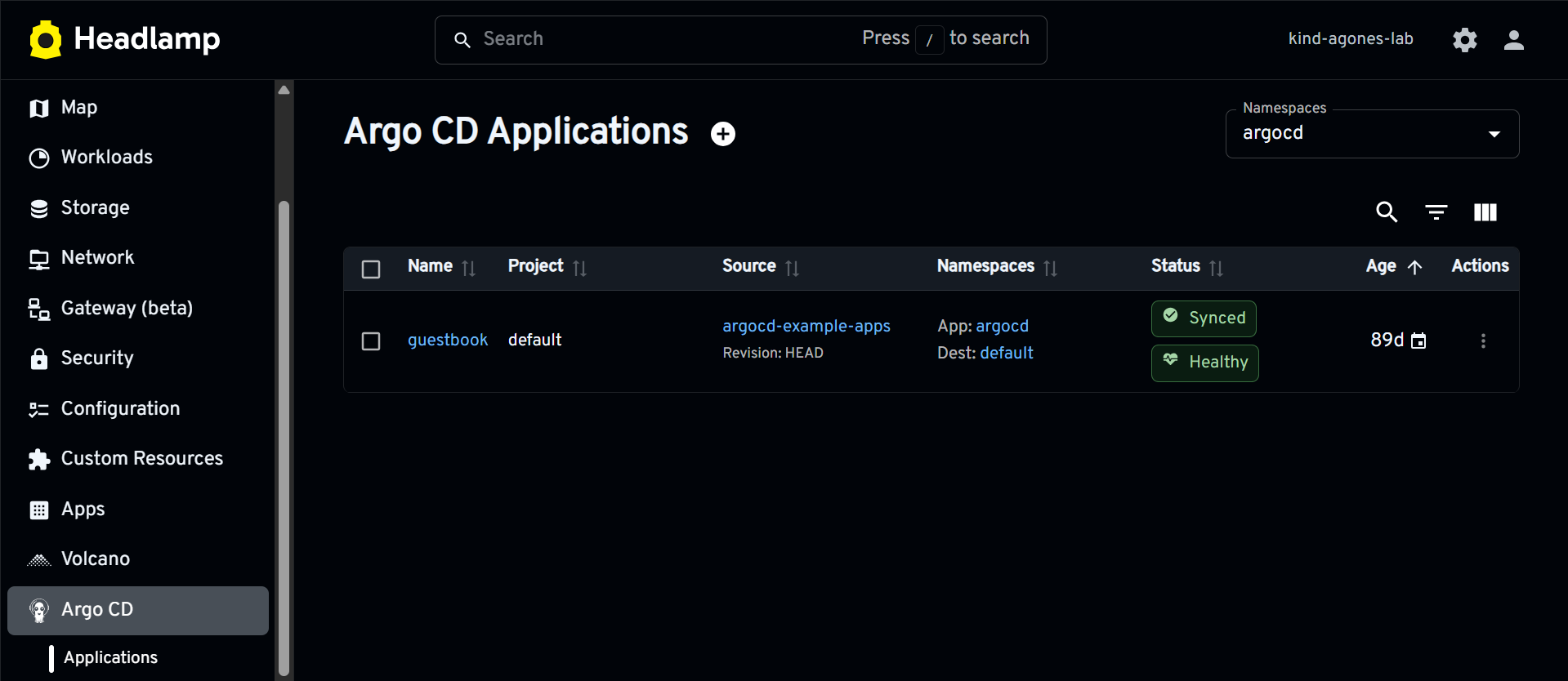
The Application list is the main entry point. It brings the details that operators usually scan first into one view: AppProject, Git source, target revision, destination namespace, sync status, health status, and age.
Argo CD Application inventory in Headlamp
Selecting an Application opens a detail page organized around the GitOps workflow. The GitOps summary shows the current sync and health states. Source and destination sections explain what Argo CD is deploying and where. The same page includes sync policy, history, controller conditions, and Kubernetes events. Applications that use multiple sources are represented without reducing them to a single repository or revision.
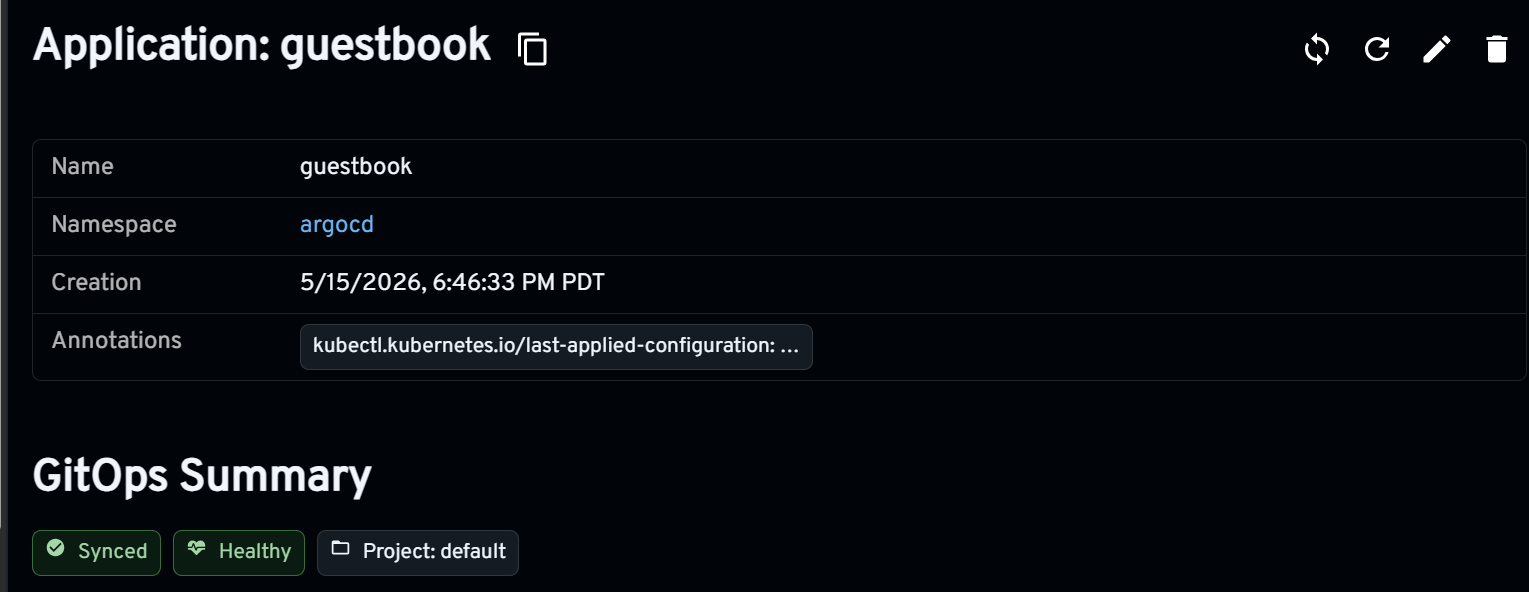
Application source, destination, sync, and health context
The Managed Resources section connects controller status to the Kubernetes objects involved. It lists the kind, name, namespace, sync state, health state, and reported API for each resource in Application.status.resources.
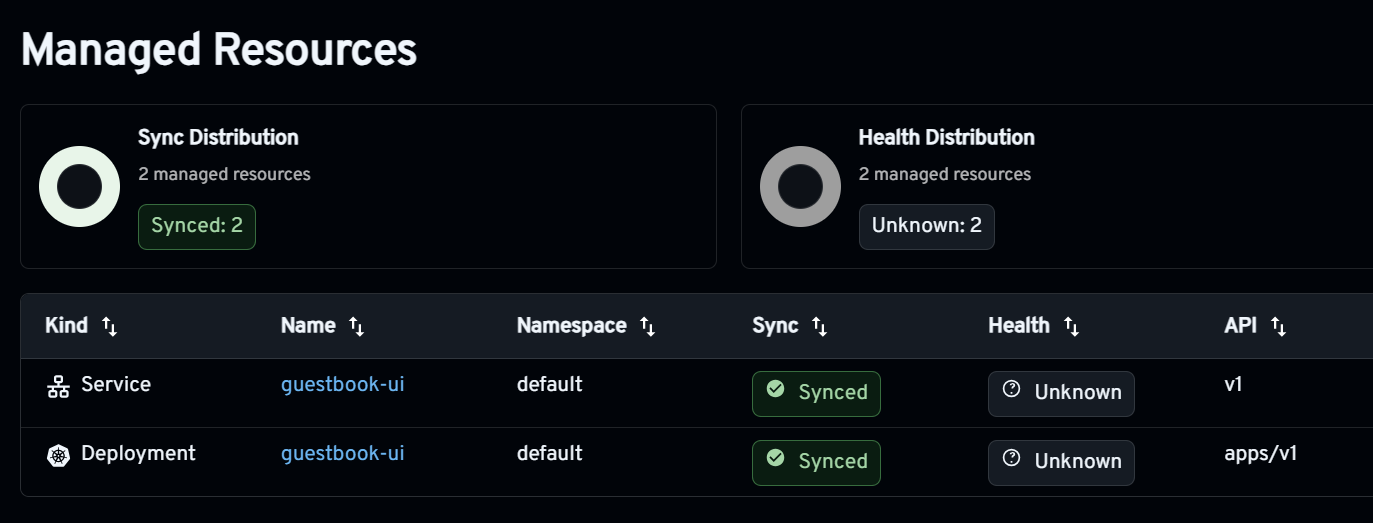
Resources reported as managed by an Argo CD Application
When Headlamp can verify a managed object in the selected cluster, its name links to the normal Kubernetes detail page. Operators can move from an Argo CD status to a Deployment, Service, or other supported object without losing the surrounding cluster context.
Make relationships visible in the Map
Tables are useful for inspecting an Application, but a topology can make relationships easier to understand. The plugin registers Argo CD as a source for Headlamp's standard Map page. Applications appear as roots connected to the resources reported in their status. An optional overlay adds the AppProject level, producing a hierarchy such as AppProject → Application → managed resource.

An Application and its managed Kubernetes resources in Headlamp's Map
The graph distinguishes two kinds of relationships. An Application-to-resource edge means that Argo CD reported the resource as managed. A Kubernetes ownership edge is added only when a live child's ownerReferences UID matches another verified live node. The plugin does not infer ownership from names, labels, namespaces, kinds, or display order.
Cluster identity matters just as much as object identity. An Application can target a cluster other than the one currently selected in Headlamp. The plugin resolves native Kubernetes objects only for Applications that explicitly use the in-cluster destination. Remote, unsupported, missing, or otherwise unverified resources remain visible as read-only synthetic nodes and do not open a same-named object from the local cluster.
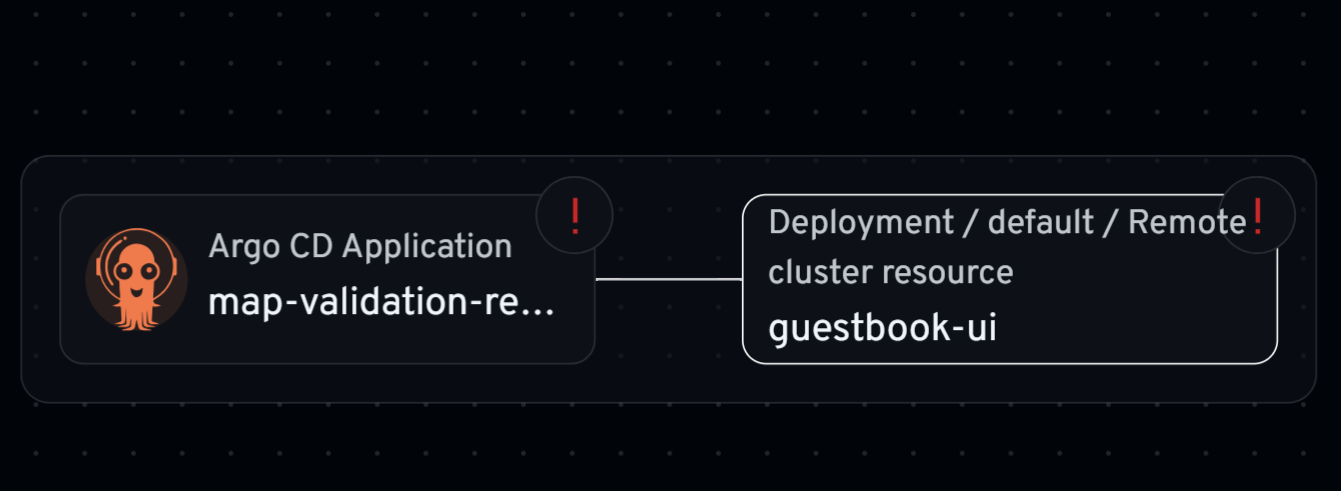
Remote or unverified managed resources remain visible without unsafe local links
Keep operational actions within Kubernetes RBAC
The plugin performs Sync and Refresh through the Kubernetes API rather than introducing a separate Argo CD credential. Sync patches the Application's operation field, while Refresh sets the Argo CD refresh annotation. Headlamp's authorization checks hide these actions when the current user does not have the required Kubernetes patch permission.
Rollback follows the same Kubernetes-native approach but requires more deliberate interaction. The action appears only when automated sync is disabled, no other operation is active, and Argo CD has recorded a complete earlier source snapshot. The dialog starts with no selection. The operator chooses a historical deployment and reviews its revision and deployment time before confirming.
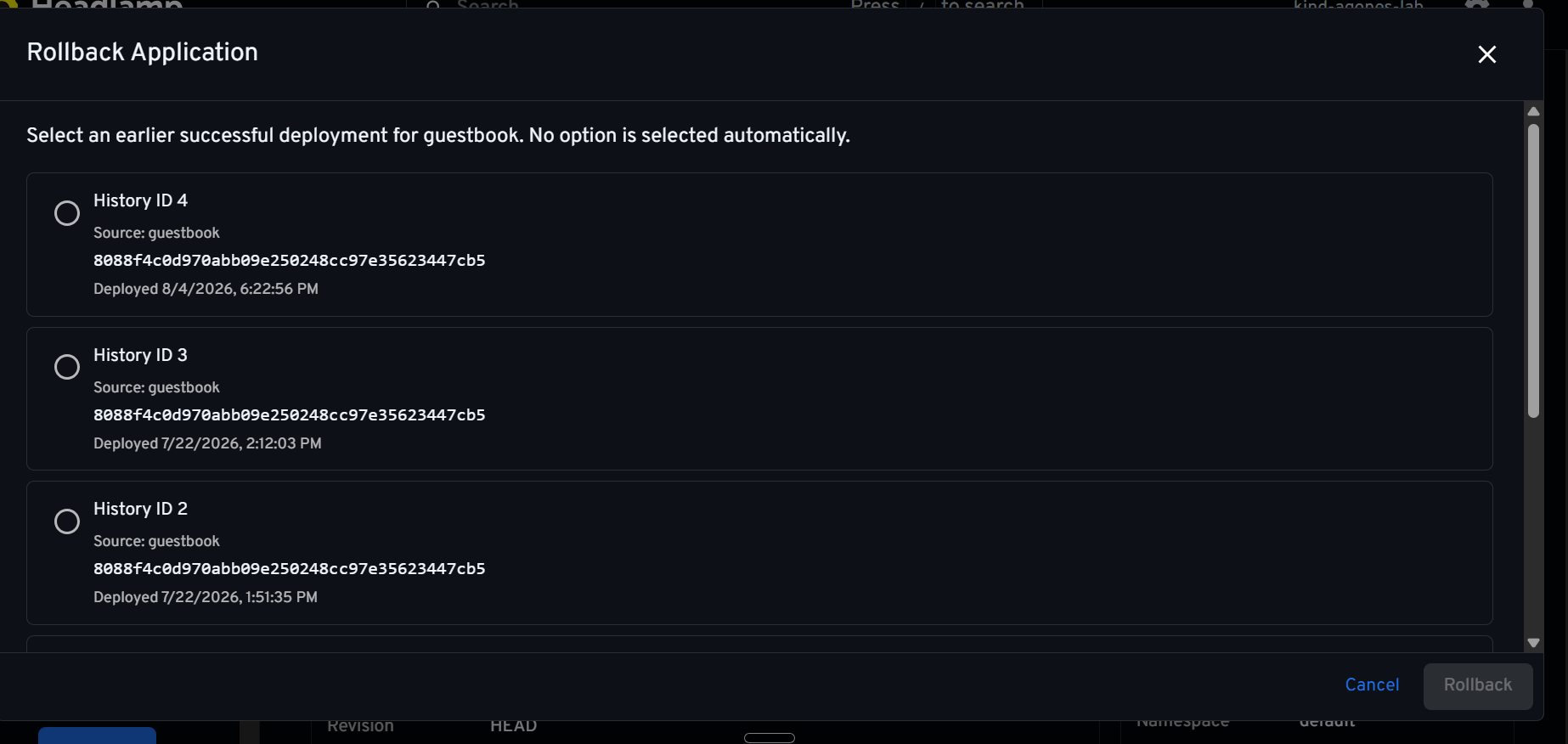
Rollback requires an explicit historical deployment selection
The rollback request updates only the top-level operation. It does not rewrite spec.source.targetRevision, alter spec.sources, or modify the Git repository. Argo CD performs the operation asynchronously, and Git remains the source of truth.
Some workflows remain better suited to Argo CD's own interface, including advanced diffs and controller-specific resource actions. When argocd-cm provides a valid HTTP or HTTPS server URL, the Application header includes an Open in Argo CD action. It opens the exact Application in a new tab and lets Argo CD handle its normal authentication. If the URL is absent, invalid, or unreadable, the action is not shown.
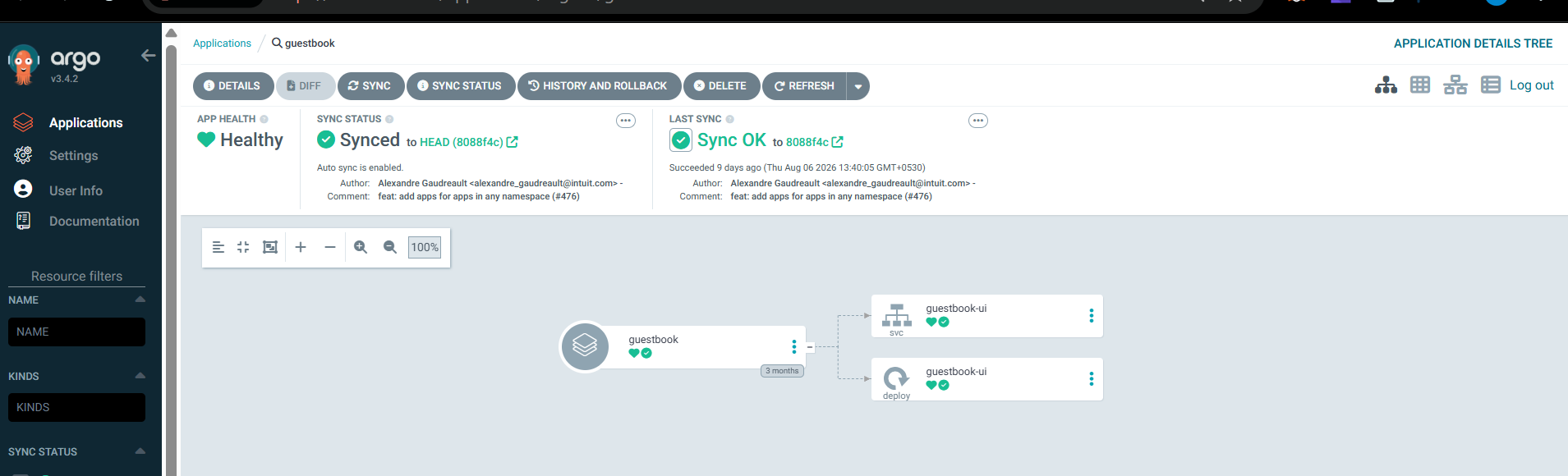
Headlamp can open the same Application in the configured Argo CD UI
Add diagnostic context without overstating it
An Application can be Synced and Healthy even when its workload does not behave as expected. For verified local destinations, the Managed Resources view compares each resource's API with the APIs served by the selected Kubernetes cluster. This can reveal missing APIs or unsupported versions.
This is an early diagnostic signal, not a complete health check. Events, logs, metrics, and application monitoring are still needed for deeper troubleshooting.
Understand AppProjects, ApplicationSets, and team boundaries
AppProjects define which sources, destinations, and resource types an Application may use. Dedicated list and detail views expose those boundaries alongside repositories, destinations, roles, and resource rules. Namespace GitOps insights approach the relationship from the other direction: while viewing a namespace, an operator can see the Applications associated with workloads there.
ApplicationSets add another layer. One ApplicationSet can generate Applications for multiple clusters, environments, Git directories, or pull requests. The plugin provides read-only list and detail pages for generator summaries, template sources and destinations, controller conditions, reported counts, and live generated Applications.
Generated Applications are accepted only when a live Kubernetes owner reference matches the ApplicationSet UID in the same namespace and cluster. Names, labels, template output, and naming conventions are not treated as ownership evidence. The views intentionally omit create, edit, delete, preview, and generator mutation controls.
Headlamp Projects group namespaces across one or more clusters. The plugin adds an Argo CD summary and an Argo CD Applications tab to Project pages. Membership is determined by the Application's destination, not by the namespace that stores the Application custom resource. An Application is included only when it was loaded from a Project cluster, explicitly targets the local cluster, and deploys to a namespace in that Project.
If one Project cluster cannot be read, the view keeps successful results from other clusters and clearly marks them as partial. Remote Applications and destinations without an explicit namespace are excluded rather than guessed.
View optional Application metrics
When the Headlamp Prometheus plugin is installed and configured, Argo CD Applications can expose three additional charts: sync activity, average sync duration, and orphaned resources. Queries are scoped to the Application custom resource's namespace and name.
These charts add a time dimension to the current controller status. They can show whether sync behavior has changed or whether orphaned resources have appeared, while preserving the Prometheus plugin's existing time range, resolution, pause, no-data, and error behavior.
Prometheus remains optional. If it is unavailable or Argo CD does not publish a metric, the Application view continues to work and the chart uses the normal no-data state. Metrics complement Argo CD status and Kubernetes diagnostics; they are not presented as proof of application health.
How to use the Argo CD plugin for Headlamp
Install Argo CD in a Kubernetes cluster and make sure the user accessing Headlamp can read the Argo CD custom resources they need to inspect. Install the Argo CD plugin for Headlamp from Headlamp's Plugin Catalog and reload Headlamp. The Argo CD section appears when supported Argo CD CustomResourceDefinitions are available.
Read-only views require Kubernetes get, list, and watch access for the relevant Argo CD resources. Sync, Refresh, and Rollback additionally require patch permission on Applications. The optional native Argo CD link requires read access to the argocd-cm ConfigMap, and metrics require a configured Headlamp Prometheus plugin.
For current installation details, supported views, and RBAC examples, see the README for the Argo CD plugin for Headlamp.
Developed during LFX Mentorship
The Argo CD plugin for Headlamp was developed through the CNCF LFX Mentorship program under the Headlamp project. The work began with Application visibility and grew through community feedback into resource topology, safer cluster-aware navigation, guarded actions, API discovery, ApplicationSet inventory, Project integration, and optional metrics.
The mentorship also provided experience with the less visible parts of Kubernetes UI development: handling incomplete custom-resource status, respecting partial RBAC visibility, distinguishing cluster identity, validating API discovery results, preserving Git as the source of truth, and writing tests for cases where the interface must refuse to guess.
Feedback and questions
The plugin continues to evolve through feedback from Argo CD and Headlamp users. Report bugs or propose improvements in the Headlamp plugins repository. Contributors are welcome to open pull requests, and the Headlamp community is available in the #headlamp channel on Kubernetes Slack.